TreadmillReviews.com helps consumers find the best home fitness products. When you buy a product we recommend, we may earn a commission.

Features

7/10

Tech Specs

8/10

Build Quality

7.5/10

Treadmill Review

Updated: May 6, 2024

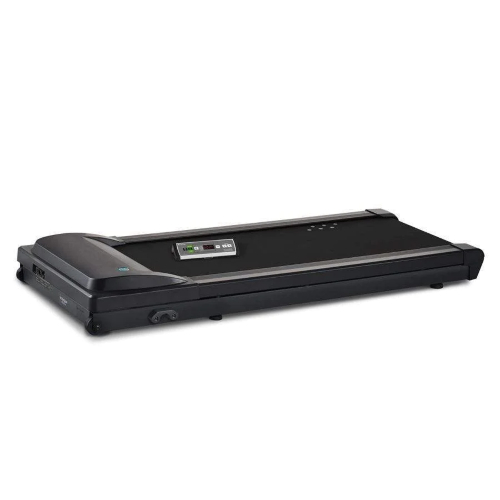
LifeSpan wants you to get more physical activity every day. LifeSpan products are designed for your home office, not your home gym. This review of the LifeSpan TR1000 Under-Desk Treadmill reports why you should or should not consider it for the latest addition to your space. LifeSpan treadmills stand out from cheaper competitors with their durable builds and innovative features. If you want to walk for hours per day or share your treadmill with coworkers, LifeSpan is a brand you should consider. The TR1000 is the most affordable entry point into LifeSpan’s under-desk treadmill lineup.

See Best Price

Who The LifeSpan TR1000 Is Best For:

  • Remote Workers: The TR1000 is a great pick for the home office. It’s more affordable and compact than LifeSpan’s other under-desk treadmills.
  • Office Workers: The TR1000 supports up to 6 hours of daily use. That’s enough time for you and 5 coworkers to train for 1 hour per day.
  • Exercisers With No Time: The LifeSpan TR1000 is a high-quality under-desk treadmill that encourages you to multitask while working.
  • Step Counters: The LifeSpan TR1000 counts your steps so you can keep track of your progress toward your goal.

Pros And Cons Of The LifeSpan TR1000

Pros PROS

  • The LifeSpan TR1000 can handle up to 6 hours of walking.
  • The TR1000 has a 350-lb maximum user weight capacity.
  • The TR1000 is more compact than other LifeSpan treadmills.
  • Intelli-Step counts your steps as you walk.
  • Intelli-Guard pauses the treadmill when you step off.
  • The maximum speed is 4 miles per hour.

Cons CONS

  • The TR1000 is LifeSpan’s most affordable treadmill, but it is a bigger investment than other under-desk treadmills.
  • The TR1000 weighs 117 lbs which may be more difficult to move around.


Under-Desk Treadmill Review Of The LifeSpan TR1000

Build Quality

There are tons of under-desk treadmills. Choosing a LifeSpan over these other, more affordable options is a great investment for the shopper serious about increasing their physical activity. The TR1000 is the most affordable option from LifeSpan, but it has a very similar but more compact design to the best-selling TR1200.

Frame

The LifeSpan TR1000 has a 10-year warranty on its sturdy frame, which is the industry standard for home treadmills. Parts are covered for 2 years and labor for 1 year. The frame supports a maximum user weight of 350 lbs. The treadmill itself weighs only 117 lbs or 157 lbs as it comes shipped. The frame has steel components. The footrails are non-slip plastic. LifeSpan treadmills feel significantly more sturdy and supportive than the affordable under-desk treadmills you might find on Amazon.

Motor

The LifeSpan TR1000 has a 2.25 horsepower motor. This motor power is sufficient for training at the speed range of 0.4 to 4.0 mph. LifeSpan recommends a maximum use of 6 hours per day. This level of use is good for one very serious exerciser or sharing with others. The motor noise on LifeSpan treadmills, like the TR1000, is minimal and should not disturb others around you.

Running Surface

The treadmill deck is 20 inches wide and 44 inches long. LifeSpan’s other under-desk treadmills are 50 inches long, but the TR1000’s length should be suitable for most users. It also takes up less space around your desk and should be a bit easier to store. The running surface is cushioned with 6 independent compression shocks. The deck is a ¾” thick phenolic board. Most of the residential treadmills we test are of a similar thickness.

Storage

The LifeSpan TR1000 does not fold. It has transport wheels, but its 117-lb weight makes it a little difficult to move around. LifeSpan treadmills are a lot harder to move than WalkingPad treadmills, for instance. This is just one tradeoff for their more durable build. You can leave the treadmill under your desk and use a LifeSpan Yoga Ball Office Chair on top of the deck. You cannot set a chair on the deck.

Incline/Decline

The LifeSpan TR1000 does not incline or decline. Incline or decline makes working at your desk more difficult and may not be as ergonomic.

Features & Accessories

Under-desk treadmills do not need nearly as many features as fitness treadmills and exercise equipment. They are designed to help you exercise while you are working efficiently on another task. The LifeSpan TR1000 is designed to make walking while working as easy as possible while still giving you the features you most desire and helping you track your progress toward your goals.

Console Overview

The LifeSpan TR1000 has two console options: the omni hub and the retro console. These consoles are connected to the treadmill by wires but sit on your desk for easy access while you are working. Both console options allow you to start, stop, and adjust the speed of your treadmill. The Omni hub has a more modern and sleek appearance. It also takes up less space on your desk. The retro console looks more traditional but may be more intuitive to use.

Screen

The TR1000 does not have a big screen on either of its consoles. The screens are very minimal but show a variety of metrics that you can scroll through. I’ve used both consoles and did not find them distracting while I work.

Intelli-Step

Intelli-Step counts how many steps you take so you know how you are progressing toward your step goal if you have one. One thing that bothers me about working and walking is that my smart watch does not count my steps because I’m typing or keeping my arms relatively still. If you are obsessed with your daily step count like I am, the LifeSpan TR1000 makes sure you get credit for your steps.

Intelli-Guard

Intelli-Guard detects whether or not you are on the treadmill and pauses the belt if you step away. This feature keeps you and the rest of your coworkers safe. If you have to step away from your desk in a hurry, you don’t have to worry about anyone accidentally stepping on a moving treadmill belt. If you work from home, this also helps keep animals or children from getting on the treadmill if you have to step away quickly.

Bluetooth

The TR1000 is Bluetooth-enabled. The LifeSpan Club App connects to the treadmill with Bluetooth. This app lets you track your daily training, set goals for yourself, and control the treadmill. The app is free to use.

Performance

The LifeSpan TR1000 treadmill is meant to improve your day by adding exercise without being disruptive. The TR1000 is not as easy to move around as other under-desk treadmills. I like it the most for walkers who are committed to walking for long stretches. It’s not a treadmill I would want to roll in and out from under my desk multiple times per day for shorter stints of walking.

The high quality of the TR1000 is what makes it a great choice for intense use. I like this treadmill a lot for offices that are purchasing a few machines to share among a few coworkers. The 4 mph maximum speed makes the TR1000 good for faster walking, so you can use it as a light to moderate fitness treadmill, too. I recommend using it with a standing desk when you walk faster for support.

Training Options

Training options are not very important for the TR1000. Ideally, you set the treadmill to a comfortable walking speed and get to work. The LifeSpan Club app lets you set goals. If you want to reach a certain distance, step count, calorie burn, or time, you can set that up in the app.

Bottom Line Review of the LifeSpan TR1000 Under-Desk Treadmill


The LifeSpan TR1000 is a well-made under-desk treadmill. LifeSpan prioritizes adding physical activity to your day. There are two console options–both sit unobtrusively on your desk. The console and the LifeSpan Club app let you track your progress toward a daily or weekly goal. The TR1000 supports up to 6 hours of walking every day. You can keep the treadmill to yourself or share it with coworkers. The TR1000 is a more expensive but more durable choice than more compact under-desk treadmills.

Read More Popular Treadmill Reviews:

MENU